
Features
The whole flow, in one app
Convert
instead of a converter
- ·Any format to any AIFF, WAV, FLAC, ALAC or MP3. It also reads M4A, AAC, OGG and OPUS, which always transcode.
- ·No re-encode if it matches Copies the bytes as they are; on MP3 and AIFF over APFS it is an instant clone at any size.
- ·Quality your way MP3 bitrate, bit depth and sample rate, or the source's own, which is the default.
- ·No silent widening Pin the depth so a 16-bit rip never quietly comes out at 24.
- ·Levelled volume One constant gain, and a limiter only when the target cannot be hit otherwise.
- ·It tells you what it will do first How far this track will move, whether the limiter steps in, and by how many decibels the peaks would overshoot.
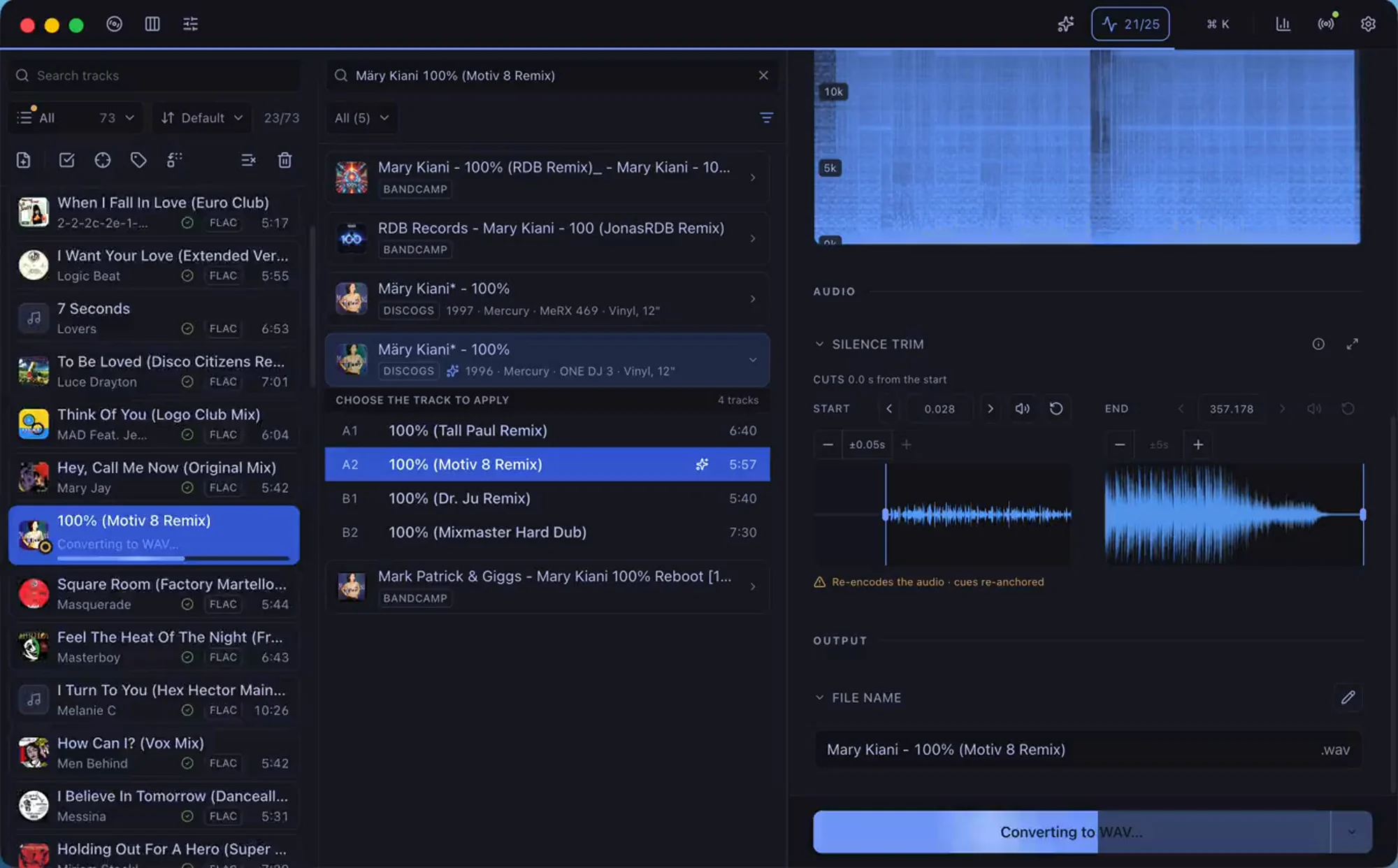
- ·Silence trimming The cut visible on the wave, with millisecond nudging.
- ·Rescues broken WAVs The header other apps choke on, repaired on a copy. Your file is never touched.
- ·You choose where it lands A folder, beside the original, Apple Music or Engine DJ.
- ·Corrected sample rate The "Corrected" mode rewrites at 44.1 only the tracks measured as upsampled; genuine and unverifiable files come out untouched. And "same as source" bit depth writes the real width: proven 16-in-24 padding comes out as true 16-bit, losslessly.
- ·Checks the copy before trusting it A half-written file declares the same duration as the whole one. Surco compares what it promises against what actually plays, and never publishes a truncated conversion.
Tag
instead of Discogs, Bandcamp and Deezer in a browser plus a tag editor
- ·Discogs, Bandcamp, Deezer Artist, album, year, BPM and key. Label and catalogue number come from Discogs only.
- ·Matches a whole release By track length, which tells two cuts apart when the title cannot.
- ·Bulk editing The fields a release shares, plus find and replace with regex.
- ·Artwork From Discogs or your own, with square cropping and a size cap you set.
- ·ID3v2.3, not v2.4 So CDJs and rekordbox read it without surprises.
- ·Ratings that round-trip In both frames Traktor and Windows Media Player read. And the stars you already set in Traktor show up here.
- ·Collector fields Style, country, media type and the release URL, under the names mp3tag uses so they never double up.
- ·You decide what Discogs touches A switch per field: the genre you set by hand survives applying a release.
- ·Apple Music grouping It writes that into its own frame, invisible to almost every other tool.
- ·Bring in an Apple Music playlist Load the playlist and work on its files. It keeps their format and fills in what only lives in Music, like the grouping. macOS only.
- ·Tags other programs left Inspect them and remove them one by one, or wipe the whole sheet.
- ·Nothing gets lost Edits save themselves: the session comes back even if the app dies mid-crate.
Analyze quality
instead of a spectrum analyzer
- ·Catches disguised MP3s Draws the spectrum with the codec cut marked on the image.
- ·Three things, not one A transcode, treble regenerated by an enhancer, and hi-res that was a stretched 44.1.
- ·No false positives It checks there is a real cut first, a cliff inside one kilohertz: a dull master is not a fake. Calibrated against 6000 real lossless tracks.
- ·It shows its work Every verdict comes with the measurement behind it: how far the energy reaches, how much it drops within one kilohertz, and why that shape gives the culprit away.
- ·An MP3 is not a defect Its cut is the format, not a flaw: it is graded on its own scale and comes out clean when it is.
- ·Colour-coded read LUFS, true peak, dynamics, L/R balance and noise floor.
- ·Clipping like Audacity Same sample-by-sample threshold, so the red marks agree with theirs.
- ·Waveform zoom ×256 Re-decodes the visible slice instead of stretching pixels.
- ·Vinyl clicks Switch between the original and the repair while it plays, with no gap, to hear what went.
- ·BPM and key From the audio itself, always as a suggestion you confirm.
- ·What you already have Tells you if a track is in your Apple Music or Engine DJ, and filters the rest.
- ·Bits, checked A declared 24-bit file is verified against its own samples: 16-bit padding gives itself away with the low 8 bits at zero in every one, arithmetic proof. The real thing earns its line with the measurement in front.
Organize and export
instead of your library manager
- ·Apple Music With tags and artwork, even on WAV. macOS only, and never FLAC: Music cannot take it.
- ·Engine DJ (Denon) Artwork, rating and playlist in your library. It backs it up first, and won't touch it while Engine is open.
- ·Artwork inside a WAV Which on its own holds neither artwork nor metadata.
- ·Traktor cue points Intact across MP3, AIFF, FLAC and WAV, in any combination. Trim and the grid re-anchors by phase.
- ·Your Traktor collection Updates the .nml with a backup and one write per batch. Needs Traktor closed.
- ·rekordbox, Serato, M3U8 Bridge files: paths and metadata. Serato's crate, paths only. No cues, no ratings.
- ·Name templates Files and titles from {artist} - {title}. A slash inside a field never makes a folder.
- ·Trash, never a hard delete Whatever you remove goes to the system Trash.
One app, not five
The work of five apps, in one click
Converter, Discogs, tag editor and Apple Music: five programs, about five minutes per track, and the tags have to be redone inside Music, cover art included. Surco folds that whole flow into one button.
- ~20 sConvert FLAC to WAVconverter
- ~60 sLook up the info on Discogsbrowser
- ~50 sWrite the metadatatag editor
- ~15 sCopy to Apple MusicMusic
- ~90 sRedo the tags inside MusicMusic
- ~45 sDrag in the cover artMusic
converting and importing run in batches · the rest repeats per track
- ·lossless AIFF, WAV, FLAC or ALAC, or MP3
- ·Discogs metadata
- ·embedded cover art
- ·grouping and tags
- ·spectrum analysis
- ·to Apple Music or Engine DJ
one click · 7 s for all 40 · up to 13 conversions at once
* The manual flow follows the one the author actually uses: convert, look up on Discogs, tag, copy to Music, then redo the tags and cover art there; steps and tools vary from person to person. Surco: converting and tagging 40 tracks of 7:08 (WAV 16/44.1 → AIFF) measured on a 14-core Mac; varies with machine, format and length.
Keyboard first
Fly without touching the mouse
A command palette and shortcuts for the whole flow: add, tag, analyze and process track after track without leaving the keyboard, and remap any of them.
Install
Download and install
Download it for your system or install it with Homebrew. Either way, it updates itself.
Or with Homebrew
$ brew install --cask surco-app/surco/surcoHomebrew: macOS only. Windows and Linux, from the download button.
FAQ
Before you download
Is it really free?
Yes. Surco is free and complete: no account, no subscription, no limits. If it saves you hours, you can support its development with a donation.
Is it a tag and metadata editor?
Yes, and more. Surco edits your music's tags and metadata (artist, title, album, year, artwork…) and fills them in from Discogs, Bandcamp or Deezer. But it also converts between lossless formats, checks audio quality and organizes your library: what you'd do with a tag editor and three other apps, in one.
Does it touch my original files?
It depends on whether the format changes. Convert to a different format and the original is left alone, with the copy going to a separate folder (Music/Surco). Re-export to the same format and Surco rewrites that file where it is, which is what lets it update the tags without re-encoding the audio. With "Overwrite original" on, it always rewrites.
Does it keep cue points?
It depends on the target format. They survive when you convert between MP3 and AIFF, and when any of the three (MP3, AIFF or FLAC) goes into FLAC: Surco reads the tree Traktor stores inside the file and writes it back in whichever form that format needs. They also survive converting to WAV, and going from FLAC to MP3 or AIFF. Only ALAC loses them, because it has nowhere to keep it. If you trim silence the cues move with it, the beatgrid included (it's re-anchored by phase so the ruler doesn't drift) and anything that can't be re-anchored reliably is dropped rather than left pointing at the wrong beat. Surco warns you before you convert.
Can I trim the silence off my rips?
Yes. Surco detects the silence at the head and the tail and shows you both cuts on the waveform, with zoom and millisecond nudges, so you can hear how it lands before applying anything. Trim one track or a whole selection at once. Note that trimming re-encodes the audio, so check the cue point answer above.
What about vinyl clicks and pops?
Surco detects them and interpolates them away as it converts, with four strengths. It marks every click it finds on the waveform so you can jump from one to the next, and it renders the repaired track so you can A/B it against the original while it plays, with no gap in the audio. So you hear whether the repair took the clicks out, and whether it took some of the music with them. It ships off.
My library is full of MP3s. Can I move them to lossless without losing my playlists?
Yes, that's what replacing does. Load the AIFF or FLAC of the same track and, if Surco finds it in your library, the button reads “Replace” instead of “Add”. On convert, the Apple Music entry stops pointing at the MP3 and points at the new file, and in rekordbox the same row is repointed: it keeps its playlists and its cue points, because rekordbox links by track rather than by path. One caveat: rekordbox analyzes the new file and may move the beatgrid, so check the grid afterwards. rekordbox has to be closed to write to its database; Surco offers to close it and backs up first. When it's done it offers to send the old file to the Trash, and warns you if it sits on a network drive, where there may be no Trash.
Does it work with Denon gear (Engine DJ)?
Yes. Pick Engine DJ as the destination and every converted track is registered straight into your Engine DJ library (with its cover, rating and a configurable playlist), ready to sync to your players. It also exports collections to rekordbox, Traktor and Serato.
Windows says "Windows protected your PC". Is it safe?
Yes. That's the SmartScreen notice for new apps not yet signed on Windows: click "More info", then "Run anyway". On macOS, Surco is notarized by Apple and opens with no warnings.
Which formats does it support?
It converts between lossless AIFF, WAV, FLAC and ALAC and MP3, any to any. The quality is yours to pick: MP3 bitrate (320 down to 128 kbps, or VBR V0/V2), bit depth and sample rate. By default the source's are kept. It also reads M4A, AAC, OGG and OPUS.
What about broken WAV files?
Old downloads sometimes carry malformed WAV headers that other apps choke on. Surco repairs them on a temporary copy as it reads (your original is never touched) so the track plays, analyzes and converts normally.
What if the app closes mid-session?
You lose nothing. Surco saves your unapplied edits on its own as you work, and on reopening it offers to restore the session with everything just as you left it. Metadata, covers and matches included, even after the machine froze.
Which languages is it in?
Spanish, English, German, French and Portuguese (Brazil). It follows your system language by default, and you can pin one in Settings.
Which systems does it run on?
macOS (Apple Silicon and Intel), Windows and Linux (AppImage). It updates itself, so you'll always have the latest version.